IT Technicians & Admins
Close tickets remotely, patch systems, transfer logs, and use Wake-on-LAN for after-hours fixes.
UltraViewer.dev | Proven Remote Desktop
Reach customer and colleague PCs from any location. View their desktop safely, talk through built-in chat, and move files during the session. Over 40 million downloads worldwide.
100% Free v6.6.127 AES-256 Encrypted

A no-cost Windows utility aimed at repair shops, distance learning, and day-to-day troubleshooting. No complicated setup. Just ID, password, and connect.
UltraViewer lets you control another Windows PC as if you were sitting right in front of it. Your partner shares the ID and password shown on their screen. You enter them and press Connect.
Technicians, freelancers, and educators use it to fix problems, demo software, and train users without expensive on-site visits.
How to connect in 5 steps →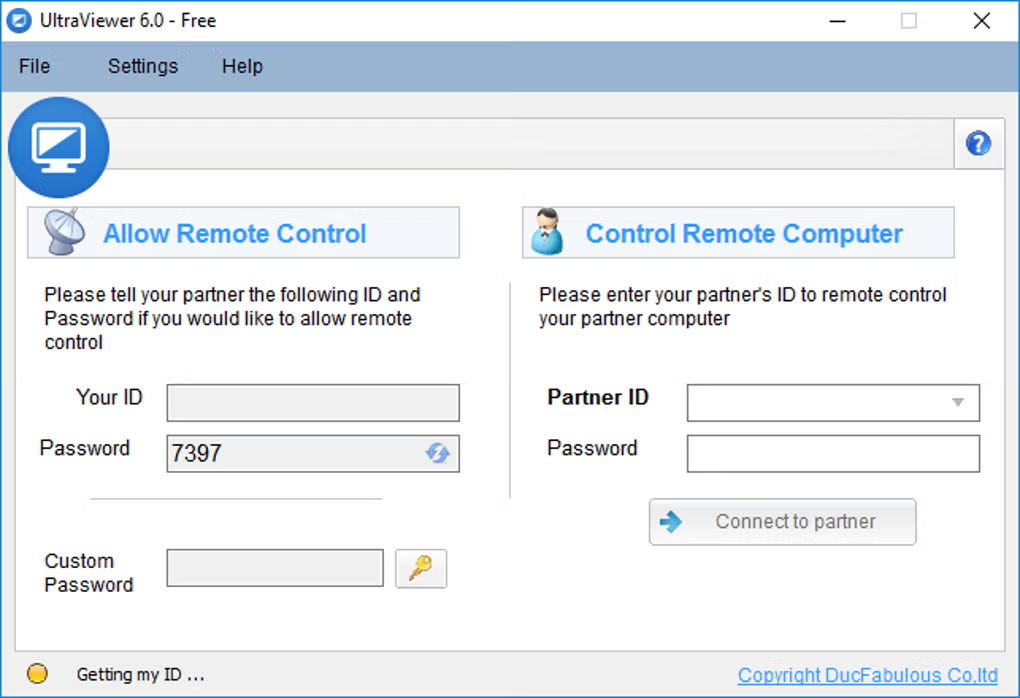
Six core strengths that make UltraViewer a practical TeamViewer and AnyDesk alternative. View full feature list
Your partner sees everything on screen and can take back control anytime. Built for transparent support.
Talk while you work. Press F1 to toggle chat. Send files up to 2 GB on the free plan.
Control several PCs at once or share your screen with multiple partners.
ID and password connect through NAT and routers. No port forwarding required.
Sessions are encrypted end to end. Access only with partner permission.
Small installer (~3.5 MB). Low CPU and RAM use for smooth daily support.
Whether you run an IT desk or help family with their PC, UltraViewer fits your workflow.
Close tickets remotely, patch systems, transfer logs, and use Wake-on-LAN for after-hours fixes.
Debug on client machines, demo builds live, sync clipboard, and record sessions for handoff docs.
Teach online with screen sharing and view-only mode. Help others with a simple ID and password.
See why teams pick UltraViewer over other remote desktop tools in the same category.
| Capability | UltraViewer | TeamViewer | AnyDesk | Chrome Remote Desktop |
|---|---|---|---|---|
| Free for commercial use | Yes | Limited | Limited | Personal focus |
| No registration required | Yes | Account often needed | Varies | Google account |
| Built-in chat & file transfer | Yes | Yes | Yes | Limited |
| Works behind firewall | Yes | Yes | Yes | Yes |
| Portable / no install | Yes | Varies | Portable available | Browser-based |
| Windows XP through 11 & Server | Full support | Yes | Yes | Windows focus |
Real feedback from users and software communities worldwide.
"UltraViewer helps me remotely support customers from anywhere. Huge time saver and it increased my sales."
"Way better than AnyDesk for my daily remote support workflow."
Rated 4.3/5 with 576 reviews. A smart solution that saves time and resources.
5.0 scores for ease, features, design, and support. Lightweight and completely free.
Great TeamViewer alternative with secure ID/password access and generous free 4K support.
UltraViewer is built for legitimate remote support only.
Common questions before you download.
Download UltraViewer 6.6.127 for Windows XP through 11 and Server. Free, fast, and ready to use.
Get UltraViewer Now